
Symptom
When running Transfer to Current for a board, the process fails with an error similar to:
Transfer to Current Board — Failed
spmw_Create_New_Cal (50000:1): spmw_Create_New_Cal (245): Conversion failed when converting the varchar value '' to data type int. Uncommittable transaction is detected at the end of the batch. The transaction is rolled back. Warning: The join order has been enforced because a local join hint is used.
The error message references spmw_Create_New_Cal, which may lead users to believe a new calendar needs to be created. This is not the correct fix — creating a new calendar does not resolve the underlying issue.
Root Cause
This error occurs when the board-level calendar has a Custom Rotation configured instead of a Daily Rotation.
The board level should never have a special/custom rotation schedule set up. Board calendars are meant to use a standard daily rotation; custom rotations should only be configured at the school level, where applicable. When a custom rotation exists at the board level, the spmw_Create_New_Cal stored procedure fails while trying to convert an empty custom order value during the transfer process, causing the transaction to roll back.
Resolution
Instead of creating a new calendar, correct the board calendar's rotation setting:
- Go to Main Menu > Setup > Board > Calendar.
- Click the three dots (⋮) in the top-right corner of the calendar view.
- Select Calendar Options.
- Under Daily cycle, change the setting from Custom Rotation to Daily Rotation
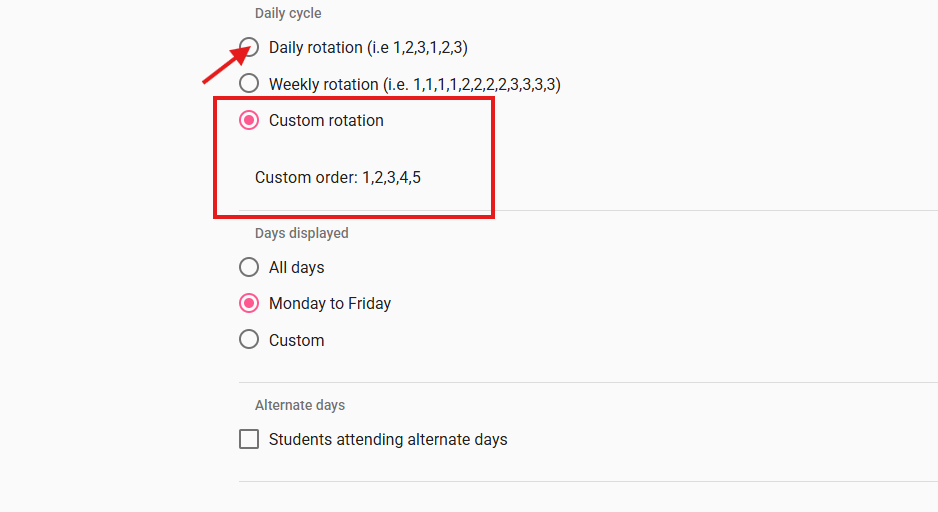
- Click Save.
Once saved, re-run Transfer to Current for all schools. The transfer should now complete successfully.
Key Takeaway
- Board-level calendars should always use Daily Rotation (or Weekly Rotation, if applicable) — never a Custom Rotation.
- If this error recurs after a calendar recreation, check the board calendar settings first before investigating further, as a custom rotation at the board level is the most common cause.